Blog
Mastering How to Create Advertising Group That Converts
Published July 26, 2026
You've got the product connected, the dashboard is open, and now you're staring at too many toggles to trust your own judgment. That's usually the point where first-time merchants start improvising, and improvisation is expensive in paid media. The fix is to build one tight advertising group at a time, with a clear theme, clean naming, and creatives that belong together.
The ad group is often mistakenly treated as a folder, which is an incorrect mental model. In Google Ads, Google explicitly treats ad groups as a core account structure, recommends narrow themes, closely related keywords, and at least 3 ads per group, and even shows the last 30 days of performance in the default Ad groups view, which is a clue about where optimization happens in practice (Google Ads help). Search Engine Journal's guidance points the same way, toward narrower clustering, match-type mirroring in high-volume cases, and structure that reflects geography when that matters more than device splits (Search Engine Journal).
Table of Contents
- What an Advertising Group Actually Does in Your Account
- Setting Up the Ad Group in Meta Ads Manager and Google Ads
- Naming Conventions That Save You Later
- Audience, Budget, and Bidding as One Decision
- Pairing Tags, Angles, and Creatives to the Ad Group
- Tracking, Quick Checks, and the Mistakes That Drain Budget
- Your First 48 Hours and What to Do Next
What an Advertising Group Actually Does in Your Account
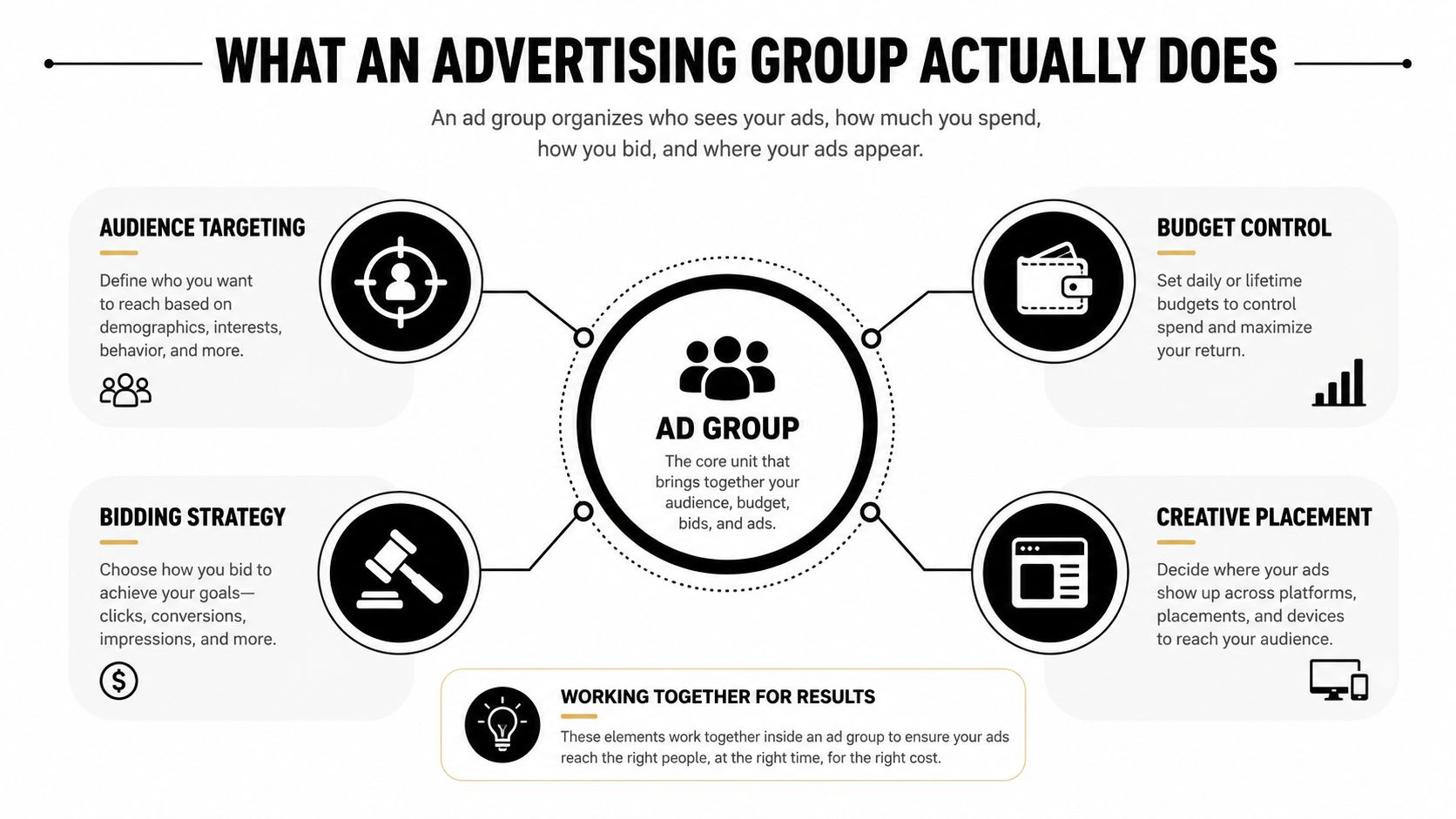
A first-time merchant usually meets the dashboard after the payment method is live, the campaign is half-built, and two dozen toggles are blinking back like they're daring you to touch the wrong one. At that moment, the advertising group is not a folder, it's the place where the actual business decisions collide. Audience, budget, bidding, and creative all meet there, and if you build that layer badly, the rest of the account just carries the mistake faster.
In Meta, the same idea lives at the ad set level. In Google Ads, it lives in the ad group. The label changes, the job doesn't. Both platforms use that layer to bind the targeting logic to the creative logic, which is why account structure has to be planned before launch instead of repaired later.
The practical rule is simple. Campaign settings decide the objective and broad budget rules. Ads decide the message. The middle layer decides who sees what, how much you spend, and what message gets tested against that audience. If you skip that clarity, you end up with a campaign that looks organized but tells you nothing useful.
Practical rule: build the ad group around one theme, one audience signal, and one decision you're willing to learn from.
That's also where a tool like Social Loop AI fits naturally. It generates the inputs, angle batches, tagged creatives, and a landing-page score, then the advertising group turns those inputs into a structured test instead of a guess. The ad group is the container for that work, not the substitute for it.
Setting Up the Ad Group in Meta Ads Manager and Google Ads
Meta and Google make you do the same job with different labels, and beginners waste time acting like the platforms demand different strategies. They don't. The workflow is the same. Set the structure first, then keep the inputs tight.
Meta Ads Manager
In Meta Ads Manager, pick the campaign objective first, then move into the manual ad set layer. That is where targeting, placements, and spend sit together. Name the ad set before you touch the rest of the fields. A vague draft name turns into a mess the moment you duplicate it.
Keep the ad set narrow enough that you can explain it in one sentence. If you cannot say who it is for and what angle it is testing, it is too broad. I would rather launch fewer clean ad sets than a pile of fuzzy ones that blur the results.
If you are brand new to Meta, use this Instagram ads setup overview as a setup map. Read it for the click path, then come back and build the structure with discipline.
Google Ads
In Google Ads, open the target campaign, go to the Ad groups tab, click the blue plus button, and build the ad group around a tightly themed keyword cluster. Keep the theme narrow. Keep the keywords closely related. Keep the group organized around one search intent, not a pile of loosely related terms. That is the part beginners usually skip, then wonder why the data gets noisy.
The ad copy should match the keyword theme, and the landing page should point in the same direction before you save. The ad group is the unit where the message, the keyword set, and the destination page all have to agree. If one of those three drifts, the group starts sending mixed signals and the budget goes to waste.
Do not build the ad group first and decide the theme later. Set the keyword theme, the ad copy, and the landing page together, then save the group.
The reason Meta calls it an ad set and Google calls it an ad group is mostly UI language, not strategy. Meta is naming the settings around the ad. Google is naming the keyword cluster around the ad. In both platforms, that middle layer is where targeting and creative get locked together, so the structure has to be deliberate from the start.
Naming Conventions That Save You Later
A good naming convention feels boring on day one and brilliant on day ten. That's the point. You want names that still make sense when you've got five tests open, three of them paused, and one duplicated from an older concept you barely remember.
Use a formula you can scan fast
My default format is Date_Product_Angle_Audience. Keep it short, keep it readable, and keep the moving parts in the same order every time. If you want even more traceability, add the platform or the market, but only if it helps you search faster in the dashboard.
Weak names look like this, Test 1, New Ad Set, or Summer Launch A. Strong names look like 2026-07-26_Skincare-Serum_UGC_Women-25-44 or 2026-07-26_Shaving-Kit_Social-Proof_Broad. The point is not decoration, it's retrieval.
Leave out the junk
Do not pack the name with creative IDs, emoji, full sentences, or phrase fragments that only make sense to you while you're half-asleep. Those details break scannability. They also age badly the moment you duplicate an ad group or swap creatives.
Use a spreadsheet with one row per ad group and the same naming fields in every column. That lets you compare audience, angle, and outcome without digging through platform tabs. If you're using tagged creatives, Social Loop AI can feed the angle label straight into the name so you can trace a launch back to the creative territory that produced it, and the round-robin testing guide is the right companion if you're sorting multiple tests across the same product.
Simple rule: if the name takes more than two seconds to understand, it's too long.
Audience, Budget, and Bidding as One Decision
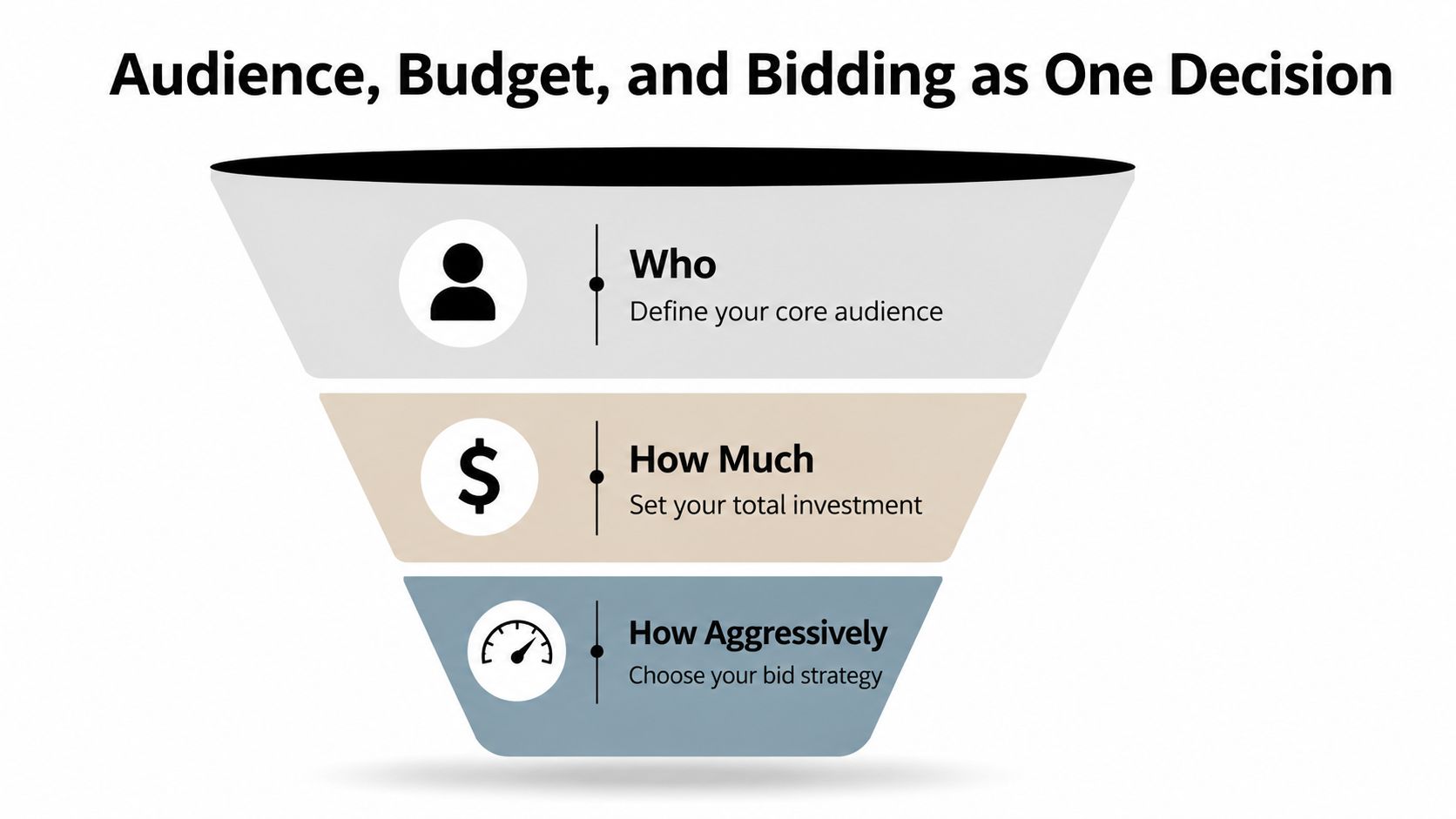
Most beginners separate audience, budget, and bidding because the platform separates the dropdowns. That's a trap. Those three settings are one decision, because they define who you're betting on, how much you're risking, and how hard the platform is allowed to push.
Start with the cheapest useful test
For Meta, a small-budget test usually needs restraint. Broad targeting is useful when you have enough budget to let the algorithm learn. Interest stacks make sense when the offer is still fuzzy and you need some directional control. Lookalikes can work, but only if you already have a real seed source, not just a hopeful assumption that the platform will do the thinking for you.
For Google Ads, audience signals sit on top of keyword targeting, so don't overload the setup. Keyword intent already does a lot of the work. Use the audience layer to guide, not to smother, the search theme.
A $20/day split that actually makes sense
If I were starting with $20/day, I'd split it into two ad sets at $10/day each. One would be a broader test with a clean angle and a wide audience signal. The other would be a tighter audience or interest cluster with the same offer, so I could see whether the issue is the audience or the message.
That split keeps the test simple enough to read. It also avoids the common beginner mistake of stretching one ad set thin across too many ideas. If the creative is weak, a smaller budget won't save it. If the audience is wrong, a bigger budget just finds that out more expensively.
Budget rule: if you can't say why each dollar is going to that audience, the setup is too complicated.
For bidding, use the least aggressive option that still lets the system deliver. Beginners usually need signal, not control theater. Start simple, watch the early delivery, and only tighten the reins once the ad group proves it deserves more spend.
Pairing Tags, Angles, and Creatives to the Ad Group
Most first launches turn messy. The audience may be fine, but the creative mix gets dumped into the wrong ad group, and then nobody knows which angle did the work. The fix is to match one ad group to one angle territory and one audience signal.
Build around the tagged creative batch
If you've got a batch of 10 image ads, don't throw all ten into one ad group. Pick 2 to 3 ads per ad group, and make sure they share the same angle label. If the batch includes Problem to Solution, UGC, Social Proof, FOMO, and Identity, keep those buckets separate so each group answers one question.
A clean launch might look like this. One ad group uses a broad audience and only the Problem to Solution creative set. The headline mirrors the same promise. Another ad group uses a narrower audience and the UGC set. That way, the result tells you whether the audience or the angle pulled more weight.
Use the page score as a gate, not a decoration
The landing-page readiness score matters because weak pages make strong ads look broken. If the score says the page needs work, fix the page before spending. That isn't perfectionism, it's basic budget protection.
One clean setup is enough to show the pattern:
- Ad group name: 2026-07-26_Skincare-Serum_UGC_Broad
- Creative set: 3 tagged UGC ads
- Headline: creator-style promise aligned to the same angle
- Landing page: passed readiness check before launch
That is how you keep creative, headline, and page in the same lane. It also makes post-launch reading much easier, because you know whether the result came from the angle, the audience, or the page.
Launch rule: don't mix a new audience with three unrelated angles unless you enjoy guessing.
Tracking, Quick Checks, and the Mistakes That Drain Budget
An ad group can look live and still be useless if the tracking is broken. That's why the pre-flight check matters more than the excitement of hitting publish. A clean launch is boring for about five minutes, and then it starts saving money.
Fix the tracking before you care about results
For ecommerce, the events that matter are the ones tied to actual shopping behavior, especially ViewContent, AddToCart, and Purchase. If those events aren't firing, your ad group can't teach you much. In Google Ads, make sure the conversion tag is installed before you trust any early signal. In Meta, verify the Pixel events at the ad set level before you let the campaign run.
If you want a reporting workflow reference once the account is live, keep this Meta reporting guide handy. It's better to build a habit around clean logs than to improvise a spreadsheet after the fact.
The mistakes that waste budget
| Check | Symptom if Skipped | One-Line Fix |
|---|---|---|
| Pixel or tag not firing | Results look empty or misleading | Verify events before launch |
| Only one ad in the group | You learn nothing about message fit | Add at least 3 ads |
| Overlapping keywords or audiences | The group competes with itself | Split the theme and add negatives |
| Ignoring placements at launch | Spend goes to placements you didn't plan for | Start with the placement setup you can actually monitor |
| Changing budget mid-test | You can't read the result | Leave the spend steady until the test has enough time |
Do not touch the budget every few hours because you're nervous. That's how you wreck the read. Watch the delivery, let the system breathe, and only intervene when the setup is clearly broken.
Social Loop's post-launch log is useful here because it gives you a place to record the ad group name, angle, audience, creative IDs, and outcome without building a custom sheet from scratch. That kind of logging turns a launch into a usable reference instead of a one-off event.
Your First 48 Hours and What to Do Next
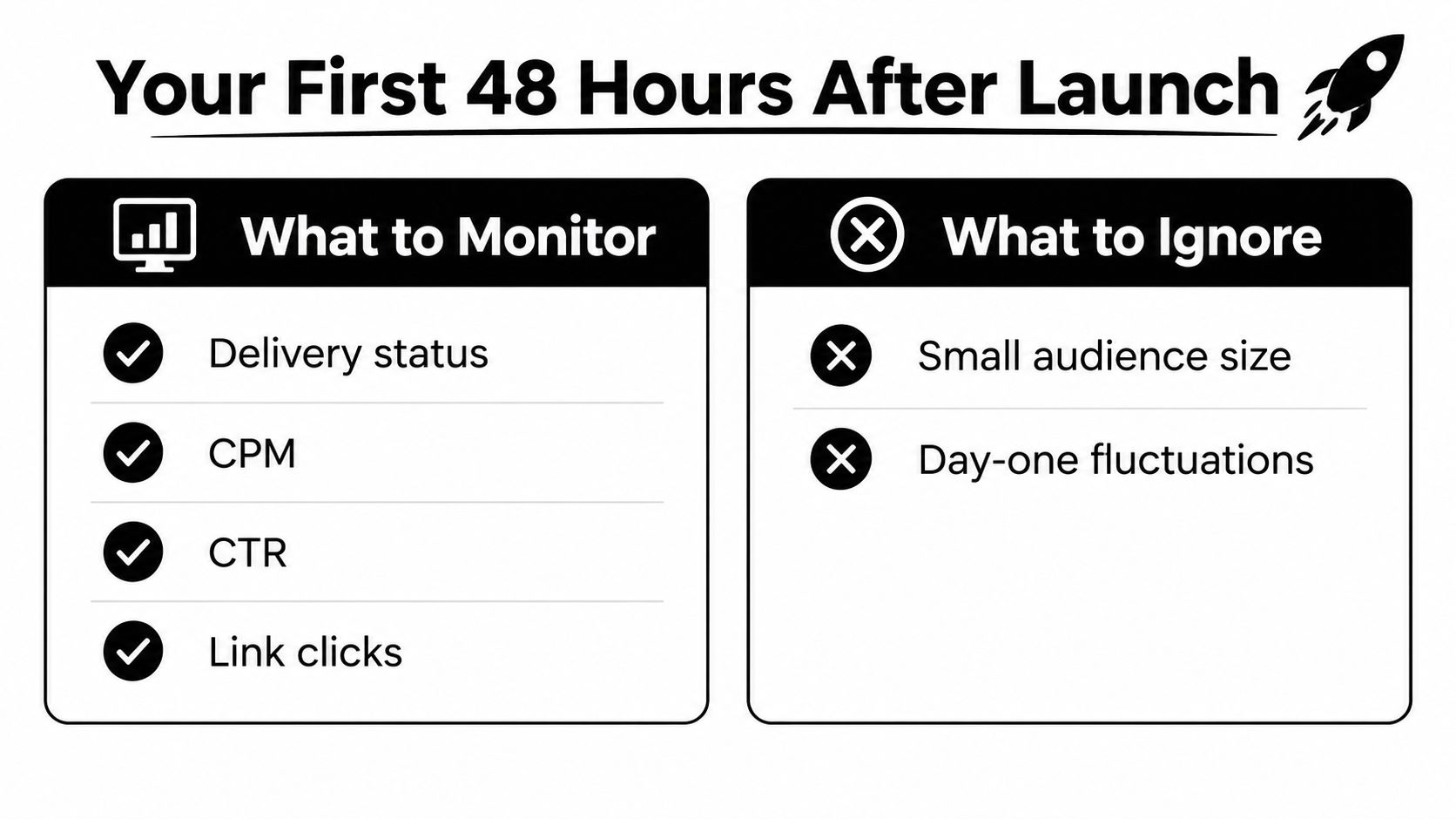
The first 48 hours are about reading the account, not chasing drama. You're looking for delivery, CPM, CTR, and link clicks, because those tell you whether the ad group is moving at all. You're not making grand conclusions from day-one ROAS, and you're definitely not panicking over a small audience size if the setup is intentionally narrow.
What to monitor and what to ignore
If delivery is active and clicks are coming in, the ad group has a pulse. If CTR is flat and link clicks are weak, the angle or the audience is off. If delivery is fine but the page doesn't convert, the problem probably isn't the ad group at all.
Ignore the urge to overread tiny early fluctuations. Ignore day-one emotional decisions. That first stretch is for signal, not victory laps.
Kill, keep, or scale
Make one of three calls after the first read. Kill the ad group if tracking is broken or the message clearly misses. Keep it running if delivery is healthy and the signal is still forming. Scale only when the result is clean enough that you know what you're funding.
The win is not a lucky first ad group. It's a repeatable note in your log that says which audience, angle, and creative combination gave you something worth testing again. That's how a first launch turns into a system instead of a story you tell once.
Decision rule: if you can't explain why the ad group won or lost, don't change three things at once.
After launch, write down the ad group name, the angle, the audience, the creative IDs, and the result in one place. Then use that record to decide what gets scaled, paused, or rebuilt next. That habit compounds faster than any dashboard hack, because the next ad group starts with answers instead of guesses.
If you want a cleaner way to turn product pages into launchable ad groups, Social Loop AI turns the page into angle batches, tagged creatives, and a landing-page score you can act on before spending. Visit Social Loop AI if you want the next launch to be structured instead of improvised, and use it to build the ad group around a real angle, not a random creative stack.