Blog
User Generated Content Strategy: A 2026 Playbook
Published June 1, 2026

You've got a product page live, a Shopify theme that looks decent, and a few polished supplier photos loaded into your first Meta campaign. The ads go out. Clicks might trickle in, but sales don't. That usually isn't a targeting problem first. It's a trust problem.
New dropshippers run into the same wall. Your store has no history, no recognizable brand, and no social proof. Buyers see a clean page, but they don't see evidence that real people use the product and like it. That's where a practical user generated content strategy changes the game. Not because it sounds modern, but because it gives strangers the proof they need before they buy.
If you're doing everything yourself, you don't need a giant content machine. You need a simple system that gets you believable photos, usable videos, honest reviews, and permission to turn all of that into ads and product page assets.
Table of Contents
- Why UGC Is Your Secret Weapon in 2026
- Building Your UGC Engine From Scratch
- The Perfect Creator Brief for Content That Converts
- Permissions, Payments, and Staying Legal
- From Camera Roll to Campaign Repurposing UGC for Growth
- Measuring What Matters Your UGC Testing Scorecard
- Frequently Asked Questions About UGC
Why UGC Is Your Secret Weapon in 2026
The biggest problem for a first-time store isn't traffic. It's credibility. Shoppers can forgive a basic logo and a simple product page. They won't forgive a page that feels unproven.
That's why user generated content works so well for small ecommerce brands. A customer photo, a casual unboxing clip, or a straightforward review does something polished creative often can't. It lowers suspicion. It makes the product feel like it exists in real life, not only inside an ad account.
A lot of beginners waste money trying to look bigger than they are. They buy mockups, over-edit videos, and write ad copy that sounds like a brand manager approved every word. That usually makes the store feel less believable, not more believable. A new store needs proof, not polish.
A good user generated content strategy is the cheapest way to create that proof at the start.
According to EveryoneSocial's roundup of UGC statistics, only 16% of brands had a formal UGC strategy while the same research reported that brand engagements rise by 28% when consumers interact with user-generated material. The same summary also reports that 79% of consumers say UGC increases trust and 79% say it influences purchase decisions.
Why this matters for a dropshipper
Those numbers matter because they match what happens in reality. A new buyer doesn't care that you finally launched your store. They care whether someone like them has already taken the risk.
Practical rule: If your store has no brand history, borrow trust from real users instead of trying to manufacture trust with polished design alone.
For a solo founder, that changes the order of operations:
- Don't lead with studio-style assets: They can help later, but they won't fix a trust gap by themselves.
- Lead with proof of use: Reviews, selfies, demos, unboxings, and simple before-and-after style clips make the product feel grounded.
- Use rough content on purpose: Not sloppy content. Real-looking content.
What works and what usually fails
Here's the short version.
| Approach | Usually Works? | Why |
|---|---|---|
| Supplier photos only | No | Buyers have seen them everywhere |
| Heavy branding before proof | Rarely | New stores haven't earned that level of trust |
| Real customer reviews on page | Yes | Reduces purchase anxiety |
| Creator videos showing use | Yes | Helps buyers picture ownership |
| Over-scripted talking-head videos | Often no | Feels like an ad too quickly |
If you remember one thing, remember this: a beginner-friendly user generated content strategy is not a content trend. It's a trust shortcut.
Building Your UGC Engine From Scratch
Most new store owners think they need customers before they can collect UGC. That's only half true. You need customers for organic UGC at scale, but you can start building your asset library before volume shows up.
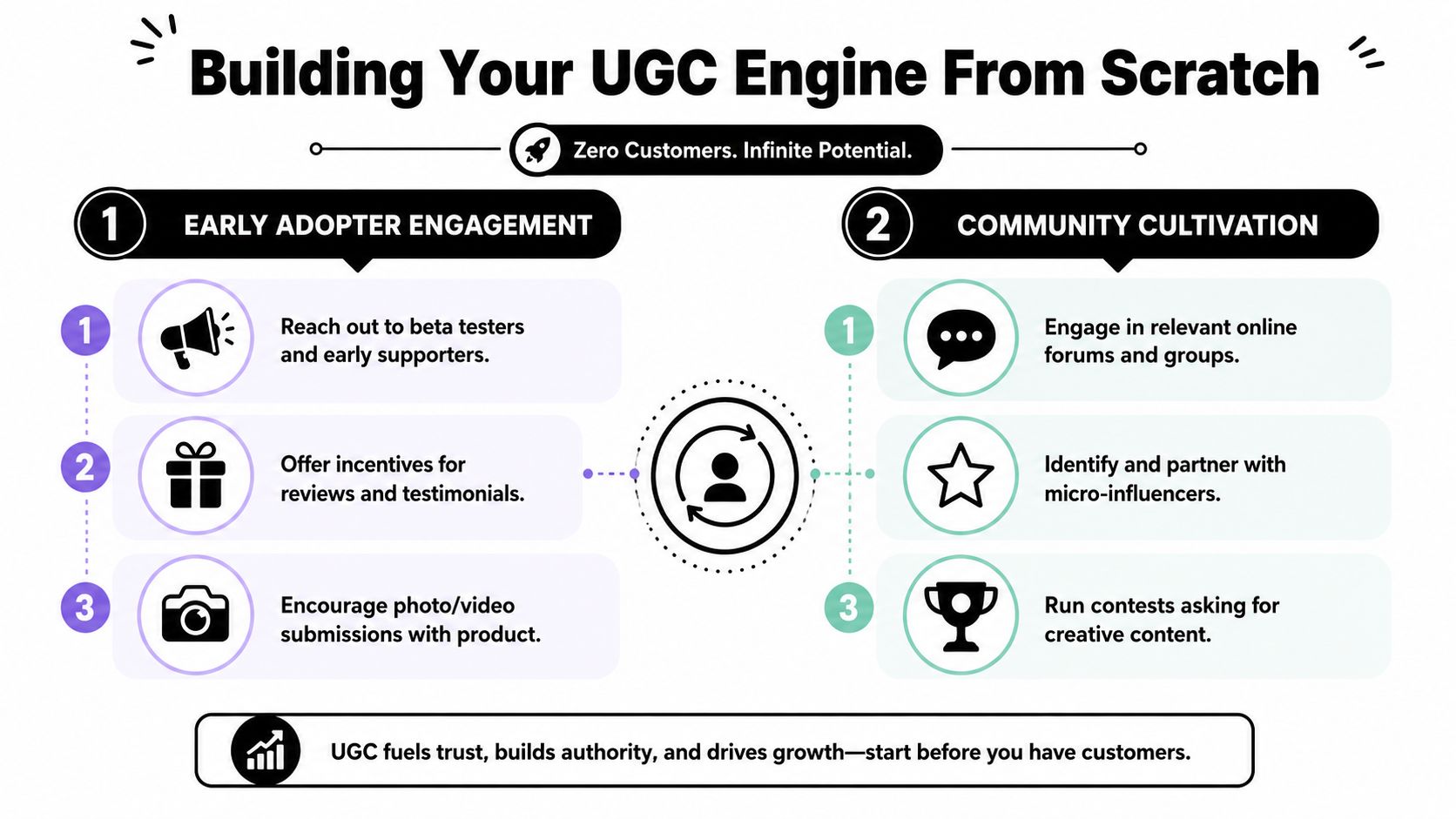
There are two paths that matter when you're small. One is proactive. The other is reactive. You need both.
Start with the proactive path
The proactive path means you go find content instead of waiting for it.
Your best early targets are micro-creators on TikTok and Instagram who already make simple product demos, unboxings, and voiceover reviews. Don't overcomplicate this. You're not hiring a celebrity. You're looking for someone who can speak naturally on camera, frame a product clearly, and follow a brief.
Search by product category, not by “UGC creator” alone. If you sell posture correctors, search product terms, pain-point terms, and niche lifestyle phrases. Look for creators whose content already feels usable in ads.
A simple outreach message works better than a fancy pitch:
Hey [Name], I run a small store in the [niche] space. I'm looking for a simple product demo or unboxing style video for paid and organic use. I can send the product and details if it feels like a fit. If you're open, send your rates or let me know if product seeding works.
A few practical rules help here:
- Prioritize fit over follower count: You're buying usable footage, not reach.
- Ask for examples with similar products: A skincare creator and a pet-product creator shoot differently.
- Start with one deliverable: One raw vertical video is enough to test a working relationship.
- Request raw files: Edited platform posts are useful, but raw clips are more flexible.
After you have a few outreach conversations going, this video is worth watching for practical execution ideas:
Build the reactive path early
The reactive path starts the moment your first real orders go out. Even if you only get a handful of customers a week, set up collection now. If you wait, you'll lose the easiest review window.
Yotpo recommends integrating review and UGC collection with SMS tools and triggering requests based on precise delivery data. It also notes that AI prompts need depth and structure, which is why a structured interview about the product improves downstream usefulness, as covered in Yotpo's guide to user-generated content strategy.
That matters because “How do you like it?” gets weak answers. Specific prompts get useful answers.
Ask things like:
- Use case: How are you using the product day to day?
- Expectation gap: What were you unsure about before ordering?
- Best feature: What stood out after trying it?
- Visual proof: Can you share a photo or short clip using it?
The lowest-budget setup that still works
You don't need a giant stack.
- For email and SMS flows: Klaviyo is the obvious starting point if you already use it.
- For review collection: Yotpo, Judge.me, or your current review app can work if it supports photo and video requests.
- For storage: A Google Drive folder with subfolders by product and creator is enough at the start.
- For tracking: One spreadsheet with columns for creator, customer, asset type, usage rights, and performance.
Weak UGC systems usually fail for boring reasons. No one asked at the right time, no one stored the files properly, or no one knew what rights the brand actually had.
That's your engine. Proactive gets you footage fast. Reactive builds the trust layer that compounds.
The Perfect Creator Brief for Content That Converts
Most bad UGC isn't the creator's fault. It comes from a lazy brief.
If you tell someone, “Just make a video about the product,” you'll usually get one of two things back. Either it looks awkward and vague, or it looks polished in the wrong way and feels like an influencer post instead of a conversion asset.
What ruins UGC before it even starts
The common mistakes are predictable:
- No objective: The creator doesn't know whether the video is for a product page, TikTok post, or Meta ad.
- Too many selling points: You dump ten features into a thirty-second script.
- No visual direction: The product stays on a desk while the creator talks.
- No usage notes: The creator adds copyrighted music, overlays tiny captions, or exports in the wrong format.
The best briefs are short, specific, and flexible. Give the creator enough structure to hit the angle, then leave room for natural delivery.
If a creator sounds like your copywriter wrote every line, the content usually loses the exact thing you hired them for.
UGC Creative Brief Template
Copy this and fill it in before you send a product.
| Brief Component | Example / Fill-in-the-Blank |
|---|---|
| Objective | Create a vertical unboxing and first-use video for a Meta ad |
| Audience | First-time buyers who are skeptical and comparing options |
| Product | [Product name] |
| Core problem | [What issue the buyer wants solved] |
| Key benefit 1 | [Main practical benefit] |
| Key benefit 2 | [Secondary benefit] |
| Key benefit 3 | [Optional lifestyle benefit] |
| Hook to test | “I didn't expect this to actually help with…” |
| Alternate hook | “Three things I noticed after trying…” |
| Visual must-have | Show packaging, product close-up, and product in use |
| Tone | Casual, honest, not overhyped |
| CTA | “If you've been thinking about trying this, check it out” |
| Do | Film in natural light, keep background clean, speak normally |
| Don't | Use background music, over-edit, read from a script, make medical or unrealistic claims |
| Deliverables | 1 raw vertical video, 1 lightly edited version, 3 product photos |
| Usage rights | Brand can use content on site, email, organic social, and paid ads |
| File delivery | Google Drive or Dropbox link |
Keep the brief strict where it matters
There are only a few places where you should be firm:
- The first three seconds need a strong hook.
- The product must appear early and clearly.
- The creator must demonstrate use, not only describe it.
- The CTA should fit the platform and not sound like an infomercial.
Everything else can breathe a little. That balance is what turns a basic user generated content strategy into usable creative instead of an expensive folder of almost-good assets.
Permissions, Payments, and Staying Legal
A lot of beginners treat permissions as admin work they'll sort out later. That's a mistake. Thirty minutes of paperwork now is much cheaper than trying to clean up a rights dispute after an ad starts spending.

The legal side of UGC gets even more important as content gets easier to fake. Hootsuite's UGC guide highlights a growing operational question around verifying and governing UGC at scale without losing authenticity, especially when synthetic media becomes easier to produce. Verification itself is becoming a trust signal.
Permission depends on the type of content
Not all UGC is the same.
A customer tagging your brand in a Story is not the same as a paid creator filming a review for your ad account. A review left on your website is not the same as a TikTok you found through a hashtag search.
Use this rule set:
- Organic customer post: Ask for explicit permission before reposting.
- Customer review submitted through your store: Check your review platform terms, but still make your reuse language clear.
- Paid creator content: Put usage rights in writing before they film.
- Content you want to run as ads: Always get paid usage rights in plain language.
Don't rely on “they tagged us, so it's fine.” That's not a real system.
What your simple agreement should say
You do not need a giant contract at the start. You do need the basics in writing.
Include these clauses:
- Who created the content: Full name or business name.
- What is being delivered: Number of videos, photos, raw files, edited files.
- Where you can use it: Website, email, organic social, paid social, product pages.
- How long you can use it: State the term clearly.
- Whether you can edit it: Cropping, subtitles, cutdowns, thumbnails, and ad versions.
- Payment terms: Product only, store credit, flat fee, or split arrangement.
- Disclosure expectations: Paid content should be handled transparently and according to platform rules.
If you collect any user data while managing creator submissions or customer content, make sure your handling process aligns with your posted policies. For a plain example of what clear disclosure looks like, review Social Loop AI's privacy policy.
How to think about payment
Here's the practical version.
| Situation | Usually fair compensation |
|---|---|
| Real customer sends a happy photo after purchase | Ask permission, offer store credit if you want more assets |
| Small creator making first sample content | Free product can work if expectations are limited |
| Creator filming to your brief with ad usage | Pay cash or agree clear value in writing |
| Strong creator with repeatable output | Move to paid relationship fast |
Don't be cheap with people who save you ad spend. Good creators are not an expense line to squeeze. They are part of your acquisition system.
From Camera Roll to Campaign Repurposing UGC for Growth
The biggest mistake with UGC is using each asset once. If a creator sends you one good vertical video, that isn't one piece of content. It's raw material for multiple channels.
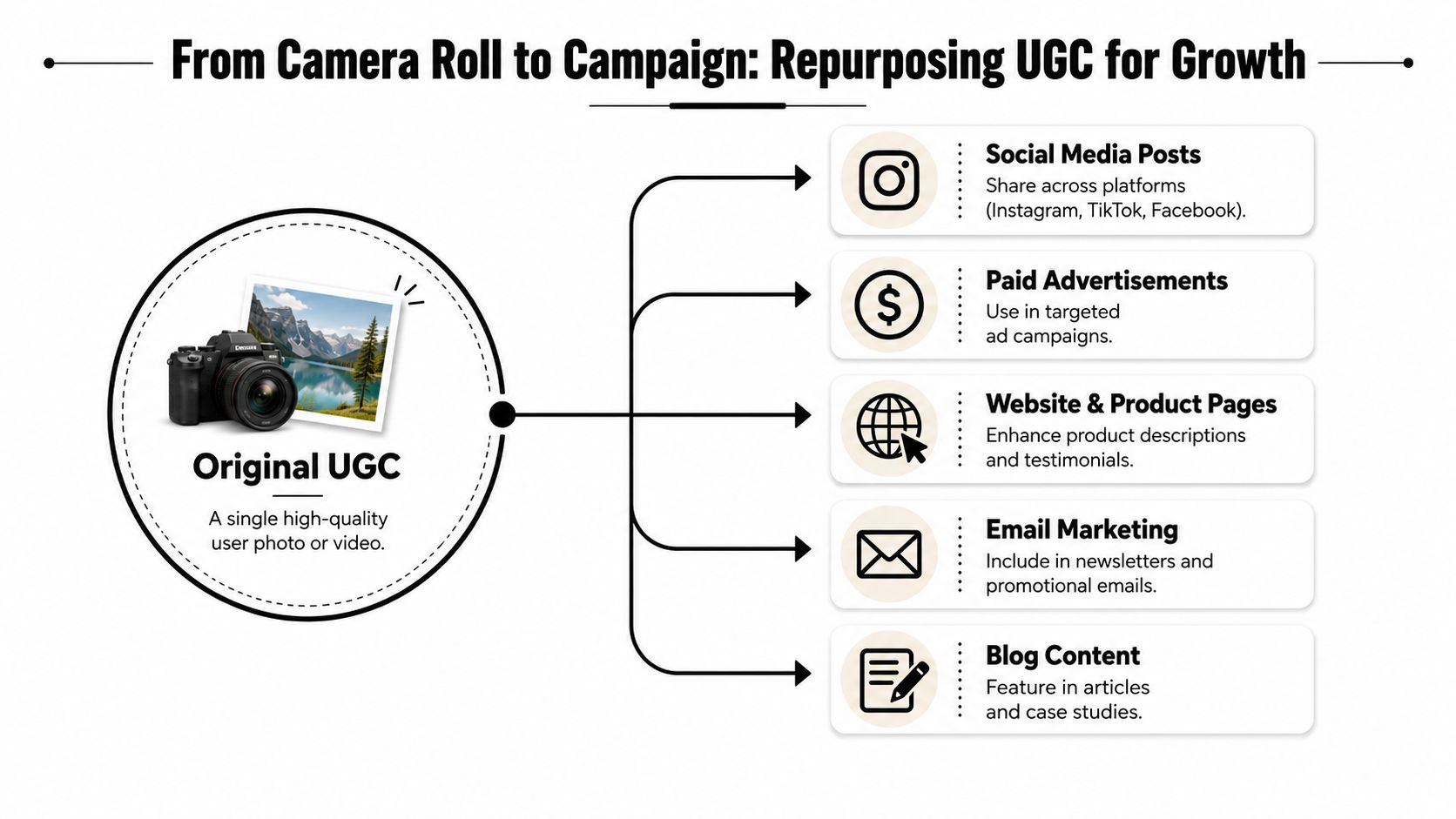
This matters because getting quality UGC takes effort. You need to squeeze as much value as possible out of every shoot, every customer review, and every decent unboxing clip.
For benchmarking, Billo's UGC statistics summary reports that user-generated posts drive about 28% higher engagement than brand-created alternatives, 4x higher click-through rates in paid ads, and up to 25–40% lower acquisition costs across major platforms. The same summary also reports that shoppers who engage with UGC convert at 161% higher rates.
Use UGC where buyers hesitate
UGC works best at moments of doubt.
On a product page, buyers want evidence. They want to know what the item looks like outside a polished mockup, whether it seems legit, and whether someone else had a good experience. That means your strongest UGC should sit close to the buying decision.
Use it in these spots:
- Product gallery: Mix customer photos with core product imagery.
- Below the add-to-cart area: Place short reviews or visual proof where hesitation starts.
- FAQ area: Turn real customer language into practical objections and answers.
- Cart recovery emails: Add a customer image or review instead of another generic reminder.
Organic social is different. There, UGC helps your product feel native to the feed. You can cut one vertical review into shorter clips, turn one comment into a quote card, or use a creator's hook line as Reel text.
Turn one asset into many assets
One decent video can become all of this:
| Original asset | Repurposed version |
|---|---|
| 30-second unboxing video | 15-second Meta ad cut |
| 30-second unboxing video | Silent version with captions for Reels |
| Product demo clip | Product page embedded video |
| Spoken review line | Quote graphic for Instagram |
| Creator still frame | Thumbnail for ad creative |
| Customer testimonial | Email block in abandoned cart flow |
Many solo founders finally achieve a powerful advantage. You stop thinking like a content creator and start thinking like a media buyer. The question becomes, “How many tests can I launch from this file set?”
If you're trying to improve ad performance specifically, this is the same principle behind stronger click-through rate testing workflows. Better hooks, better proof, and better native-feeling creative usually beat generic polished ads.
A creator video doesn't need to be beautiful. It needs to stop the scroll, show the product fast, and remove doubt.
Match the asset to the angle
Not every UGC format should do the same job.
- Unboxing videos work well for social proof and first impression angles.
- Problem-solution demos work when the product solves a clear frustration.
- Simple customer photos work best on product pages and email.
- Text reviews are strongest when tied to specific objections like fit, ease of use, setup, or quality.
That one-to-many mindset is what makes a low-budget user generated content strategy sustainable. You're not chasing endless fresh content. You're extracting more value from the good content you already fought to get.
Measuring What Matters Your UGC Testing Scorecard
Beginners waste money when they treat UGC like a vibe instead of a channel. You need a scorecard. Not a complex dashboard. Just a clean way to track what got used, where it ran, and whether it moved clicks or sales.
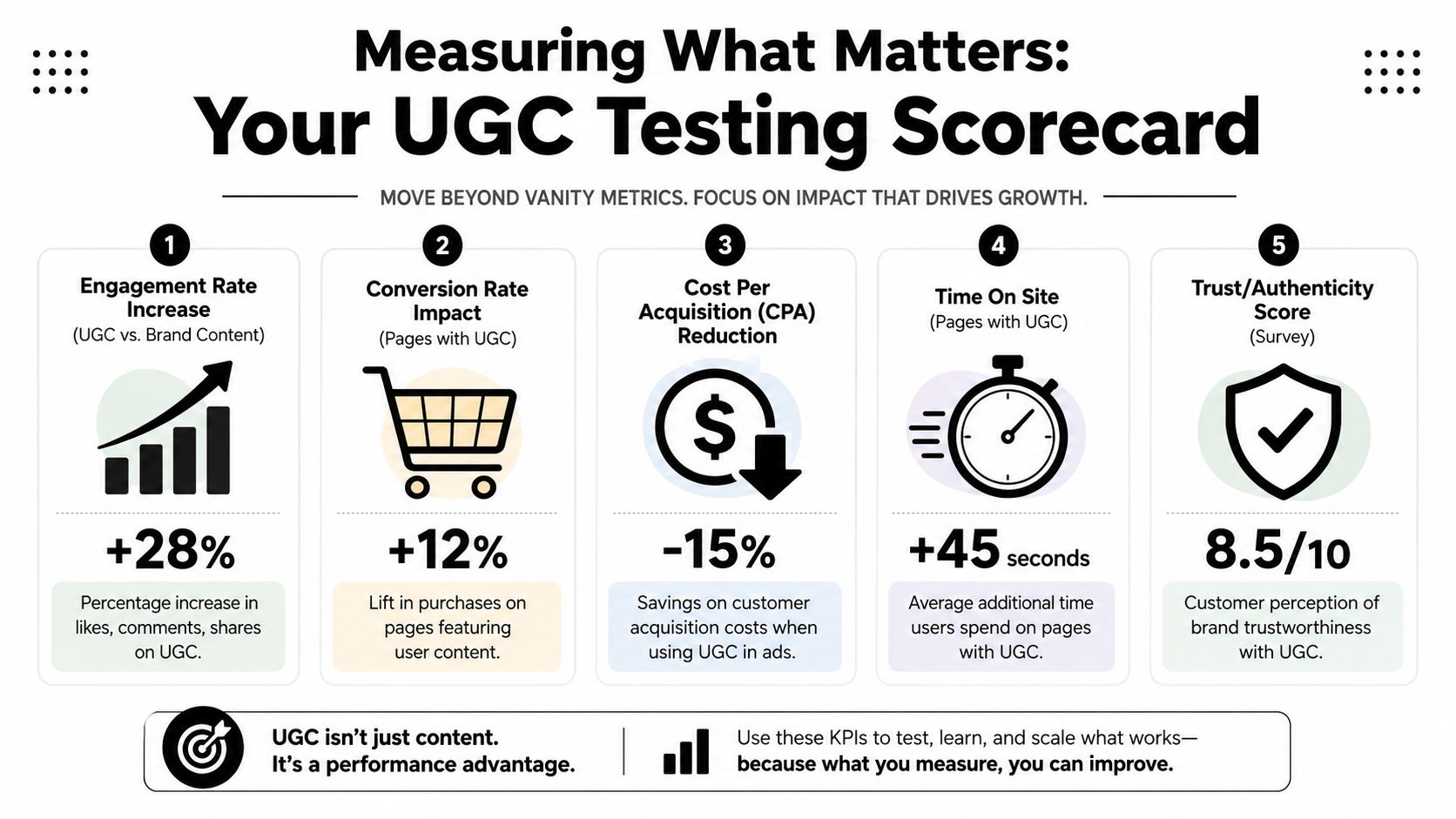
The infographic above is only a visual. For your actual decision-making, use the verified benchmarks. Salesgenie's UGC statistics roundup reports that UGC-enabled pages see 161% higher conversions than pages without UGC, and that adding just 10 reviews can lift conversion rates by about 45% to 53%.
Track business metrics first
Ignore vanity metrics until the core metrics make sense.
For Meta ads, keep your eyes on:
- CTR: Is the UGC creative getting more people to click than your non-UGC version?
- CPA: Does the content help you acquire buyers more efficiently?
- Hook retention: Which opening line earns attention long enough to matter?
For the website, keep it even simpler:
- CVR on pages with UGC: Are visitors converting better when they see reviews, photos, or videos?
- Product-level review count: Are key products still sitting with zero proof?
- Asset influence: Which specific photo, quote, or video keeps showing up in winning journeys?
A simple scorecard to keep
A spreadsheet is enough. Track each asset like it's an ad unit.
| Asset ID | Creator or Customer | Format | Angle | Used On | Result |
|---|---|---|---|---|---|
| UGC-001 | Creator A | Vertical video | Problem-solution | Meta ads | High CTR, weak conversion |
| UGC-002 | Customer review | Text + image | Social proof | Product page | Strong page CVR |
| UGC-003 | Creator B | Unboxing | First impression | Instagram Reels | Good engagement |
| UGC-004 | Customer photo | Lifestyle image | Trust | Useful supporting asset |
That single sheet helps you avoid two common mistakes. First, reusing weak assets because you forgot they already underperformed. Second, killing strong assets too early because you didn't isolate what part worked.
Keep tests clean enough to learn
Don't test five changes at once if you're on a small budget. Compare one UGC ad against one more polished brand-style ad. Change the hook, not the whole strategy. Swap the opening shot, not the product and audience at the same time.
If you want a simple framework for cleaner experiments, read this guide to multivariate testing for marketers. Even if you stay basic, the principle matters. Fewer moving parts means clearer decisions.
The scorecard is there to answer one question. Did this piece of UGC help a buyer trust enough to click or buy?
When you track that consistently, UGC stops being “content” and becomes part of your acquisition system.
Frequently Asked Questions About UGC
How much UGC do I need before I run ads
Less than commonly believed. You do not need a huge library. You need a few believable assets that cover the main trust gaps. One usable creator video, a few customer-style photos, and some real review copy can be enough to start testing.
The better question is whether your assets answer buyer doubts. If they do, run the test.
What if my first creators send weak content
That's normal. Early creator sourcing is messy. The fix usually isn't “find better people” first. It's “write a better brief, ask for clearer shots, and request raw files.”
Also, stop trying to save every asset. Some content is only good for organic posts. Some is only good for the product page. Only a small share will become ad winners, and that's fine.
Should I use customer reviews even if they are not perfect
Yes, if they are real, relevant, and not misleading. Buyers don't expect every review to sound flawless. In fact, slightly imperfect language often feels more believable than polished praise.
What matters is that the review says something useful. “Love it” doesn't help much. “Easy to set up, smaller than I expected, but works well on my desk” helps a lot more.
A solid user generated content strategy is not about collecting endless praise. It's about collecting evidence that helps the next buyer make a decision.
If you're launching your first store and need help turning rough product info into usable ad angles, creative directions, and a practical testing plan, Social Loop AI is built for exactly that stage. It helps first-time dropshippers turn a product URL into a clear Meta ads launch plan and beginner-friendly creatives without hiring an agency.